Share
Share
 ChatGPT
 Perplexity
 Claude
 Grok
Grok
 Google AI Mode
By 2030, data centers worldwide are projected to nearly double their power use just to keep pace with Artificial Intelligence (AI)-driven demand. That single trajectory makes data center infrastructure management (DCIM) one of the most business-critical disciplines in tech today.
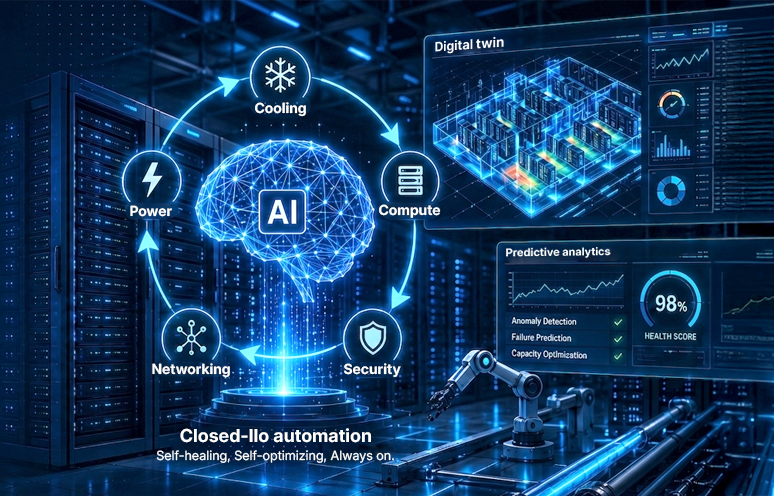
Organizations use different types of data center infrastructure, such as traditional on-premises setups, colocation, cloud, hybrid, and edge data centers. No matter the type, the core parts are the same: servers, power systems, cooling units, networks, and security controls. Managing these assets well, called Data Center Infrastructure Management (DCIM), helps businesses make smart decisions quickly. Implementing a data center operations automation solution streamlines infrastructure workflows and makes data center operations efficient.
This guide explains everything about DCIM in simple and actionable terms. You will find real-world examples and seven best practices you can use to get the most out of your data center. Whether you oversee just a few racks or a hyperscale facility, these ideas will help you manage data center infrastructure more efficiently.
What is data center infrastructure management and what role it plays in 2026
Data center infrastructure management refers to the process of monitoring and managing all aspects of a data center facility, including:
- Environmental metrics: Measuring the temperature, humidity, airflows, and hot spots to ensure that your equipment works under optimal environmental conditions.
- Energy use: Monitoring and controlling the power supply through utility grid, backup generators, Uninterruptible Power Supplies (UPS), and Power Distribution Units (PDUs).
- Resource capacity: Understanding what capacity remains, in terms of space, power, and cooling, for capacity planning of the data center infrastructure.
- Operational workflows: Managing asset life cycles, scheduling maintenance operations, and documenting changes to the existing situation digitally.
- Physical connectivity: Documenting all your networking cables and connections to avoid bottlenecks.
- Facility security: Ensuring authorized access to your racks and monitoring of smoke, water leakages and other threats to your infrastructure.
In 2026, this becomes more important. With Artificial Intelligence (AI) workloads on the rise, data centers use more power and generate more heat. Underestimating the amount of heat generated by a single rack can cause cooling failure or costly downtime.
The projections show how massive this shift will be:
- Gartner estimates that by 2030, data centers worldwide will use about 980 terawatt-hours of electricity, nearly double what they use today.
- Data Center Knowledge anticipates that global data center capacity is expected to nearly double (200 GW) by 2030. That’s equivalent to the output of 100 Hoover Dams running at full capacity.
- The European Commission’s Science Hub forecasts that global data center water consumption can climb to 5 billion cubic meters annually by 2027. That is nearly four years of total municipal water usage for New York City.
All these projections point to a simple reality, best captured in the following equations. And it’s exactly why Data Center Infrastructure Management (DCIM) matters more than ever before.
The current equation:
Higher data center capacity = More power consumption + Greater heat generation
The equation we need:
Higher data center capacity = Minimal power consumption + Lower heat generation
Although the “equation we need” is ambitious, it sets a direction for the future. Getting there starts with the operational challenges your team already manages every day.
What do daily data center operational challenges look like?
Running a data center efficiently means constantly staying ahead of a set of operational challenges that never fully go away. Here’s what teams are up against behind the scenes:
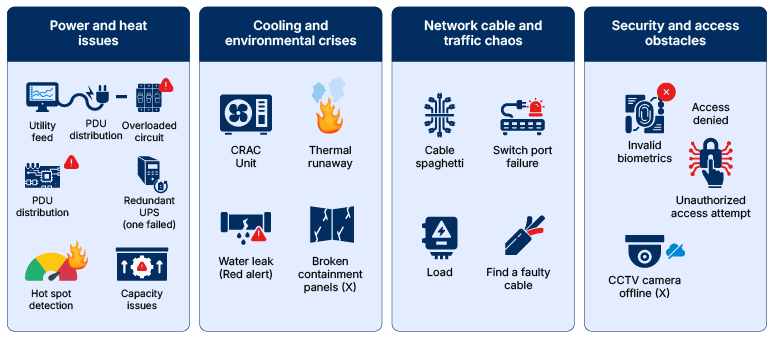
Left unmanaged, these challenges compound fast. Structured daily workflows are what keeps them from turning into bigger problems.
- Coverage gaps: Critical systems need eyes on them around the clock. Even a short lapse in shift coverage can mean a temperature spike or alarm goes unnoticed until it’s already a problem.
- Decisions made under pressure: When something unexpected happens, there’s no time to figure out the right response on the fly. Without clear, pre-established procedures, small incidents can escalate before anyone has a chance to catch them.
- Siloed teams: Facilities, IT, and security each see only part of the picture. When these groups don’t stay connected in real time, an issue that starts in one area can spread before anyone connects the dots.
Why Intercontinental Exchange’s massive scale demands operational discipline:
Intercontinental Exchange operates 13 regulated exchanges and 6 clearing houses, including the New York Stock Exchange. 700 billion transactions daily happen in this Fortune 500 company. Here, even one second delay can impact global markets. That scale demands exceptional operational discipline.
Smaller organizations face similar pressures but on a different scale. A single missed cooling check can cause a server rack to overheat within hours. Accurate operations logs make root cause analysis easier, as many outages originate from minor daily lapses. Shift handover notes and DCIM dashboards help teams track slow-developing problems across shifts.
Best practice #1: Capacity and asset management
Track what you have and what’s left to avoid running out of room, power, or cooling.
The capacity management processes ensure that there is enough power, cooling, and space in the data center. While the asset management practices monitor physical assets, like servers and cables, within the facility. Together, they answer a critical question: how much more can this facility support?
Without accurate tracking, teams either overbuy equipment or run out of capacity unexpectedly. Both are costly mistakes.
What good asset tracking looks like
- A live inventory of racks, power circuits, and network ports that update automatically as equipment is installed or retired.
- Asset tags, barcodes, and RFID trackers to locate equipment without physical searches.
- Regular audits to identify and eliminate “ghost servers”, unused machines still drawing power.
What good capacity planning looks like
- A forward-looking model that projects growth over the next 12–24 months, rather than just providing a snapshot of current usage.
- Capacity requirements calculated directly from data volume and processing needs, a practice Intercontinental Exchange highlights as central to its planning.
How Ocient enhanced capacity planning with its Hyperscale Data Warehouse:
Data analytics company Ocient built its Hyperscale Data Warehouse around energy-efficient solid-state drives (SSDs) to enhance capacity planning. One Ocient customer saved $1.6 million in energy costs over three years with this approach. That saving came from smarter capacity planning and not by adding more hardware.
Delayed capacity planning has impacts:
| Dimension | Data center operator | Data center owner |
|---|---|---|
| Core focus | Maintaining uptime and system safety | Maximizing ROI and business growth |
| Impact of delays | Overloaded circuits, hot spots, and immediate risks of localized downtime or blackouts | Capped revenue, frozen expansion plans, and missed market opportunities |
| Immediate pain point | They cannot safely “plug in” new customer hardware without risking a cooling failure or tripped breaker | They cannot onboard new high-value tenants and frustrated customers can go to competitors |
| Infrastructure bottlenecks | Immediate struggles with physical space constraints, rack airflow, and PDU limits | Supply chain delays on long-lead equipment like mega generators and liquid cooling units |
| Capital impact | High stress, emergency maintenance costs, and costly SLA violation penalties | Millions of dollars in unplanned capital expenditure (CapEx) for emergency expansions |
Best practice #2: Change and configuration management
Enforce strict control over every change made in the data center.
Change management controls how updates, patches, and configuration changes are applied inside a data center. Configuration management tracks the current state of every device and system. Together, these processes prevent small mistakes from becoming massive outages.
When a safety-check bug caused Meta’s six-hour global outage in October 2021:
Facebook’s engineers regularly send commands to check on their network, basically routine health checks to make sure everything is running smoothly. One of these routine commands accidentally told the network to disconnect Facebook’s data centers from the rest of the internet. Normally, an internal auditing tool acts as a safety check designed to catch this type of mistake before it takes effect. However, a bug in that auditing tool failed to catch the error, allowing the invalid command to go through.
Consequently, their systems could not find each other on the internet. Facebook, Instagram, and WhatsApp became unreachable for about six hours everywhere. On top of that, the outage also affected the systems for badge access to their buildings. Therefore, it took longer than usual for staff to enter the facilities, reverse the faulty command, and restore connectivity.
Mature organizations use structured change approval boards that assess risk before implementing any changes. They keep track of all configuration data, making sure that any change made can be reverted back to. Otherwise, a simple task may result in a worldwide outage of services.
Configuration drift, where the live systems differ from the approved configurations, is one more risk. Regular auditing for drift allows for detecting any discrepancies between live and baseline configurations. A peer review of commands before implementing any large-scale changes serves as an additional safeguard. This helps prevent cascading outages like the one that happened at Meta in 2021.
Best practice #3: Environmental monitoring
Maintain visibility into the physical environment to ensure uptime.
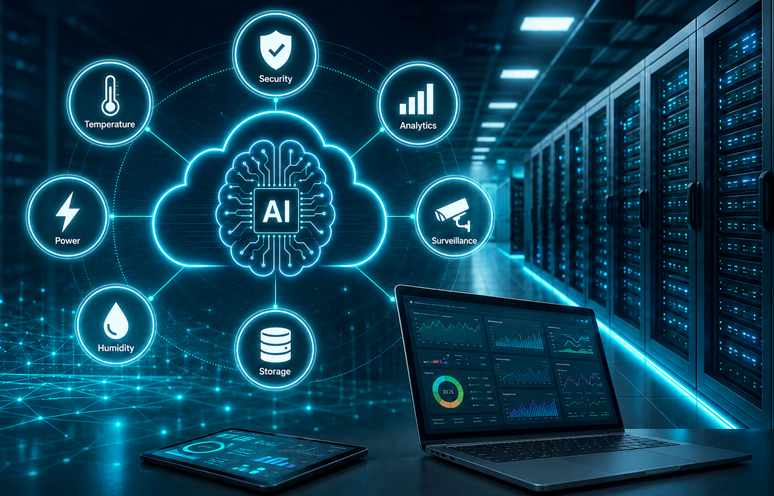
Monitoring involves measuring parameters like temperature, humidity, airflow, and electricity in the facility. Data from sensors is fed into dashboards in real-time, and automated alarms are raised when values exceed safe limits.
Cooling is the biggest contributor to energy consumption in any data center. Google addressed this by applying DeepMind’s machine learning to optimize its facilities. Analysis of thousands of sensors is done on factors like temperature, electricity, and pump speeds. They can predict cooling requirements one hour in advance, which helps optimize energy consumption for their machines. This approach cuts cooling energy use by up to 40% and reduces overall Power Usage Effectiveness (PUE) by 15%.
A PUE closer to 1.0 means a facility wastes minimal energy on overhead. It makes PUE the single most-watched efficiency metric in the industry.
Environmental control protects hardware from premature failure.
- Containment of hot and cold aisles: This strategy prevents warm air exhaust from coming into contact with cold intake air. It is a basic design decision that can save on cooling costs without any additional equipment.
- Humidity control: High or low humidity levels may cause damage to hardware. Static electricity forms in dry conditions, and condensation occurs when humidity levels are high.
- Compliance support: Continuous monitoring helps to comply with health and safety standards.
Best practice #4: Maintenance strategy
Shift from fixed schedules to condition-based maintenance.
The purpose of maintenance is to ensure reliability of the infrastructure and prevent problems from affecting end users.
- Preventive maintenance: Involves performing inspections, cleaning and replacement of parts based on a predetermined schedule.
- Predictive maintenance: Makes use of sensors and analytics to detect failure of parts before they occur.
Many operators combine both approaches for stronger and more cost-effective coverage.
What Microsoft’s underwater servers revealed about reducing human intervention
Microsoft explored an unconventional maintenance philosophy. Between 2018 and 2020, 864 servers were sealed in a container and submerged near Scotland’s Orkney Islands. For two years under the water, the servers failed only one-eighth of the servers on the land. The reasons behind this phenomenon were zero interaction with humans, constant temperature, and non-oxidative environment. However, Microsoft decided not to implement its project due to limited opportunities for upgrading the underwater centers in the future. But the experiment reinforced a key maintenance lesson: reduce unnecessary human intervention wherever possible. Each unplanned technician visit introduces some risk of accidental disruption.
Other valuable maintenance habits include:
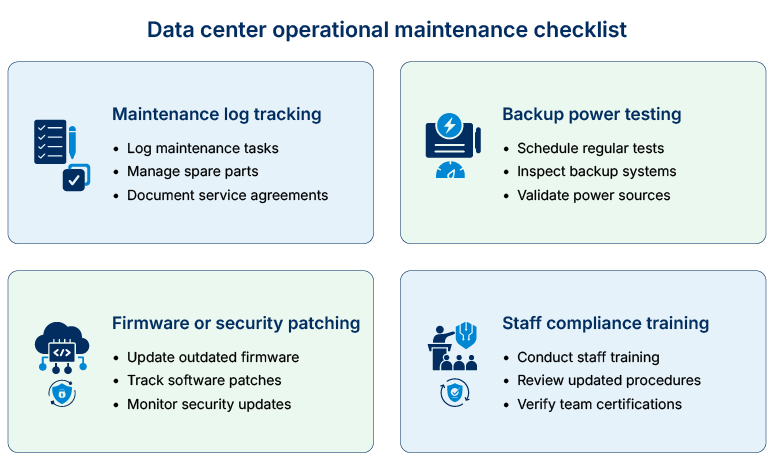
Best practice #5: Incident response
Act decisively in the first minutes after an incident happens.
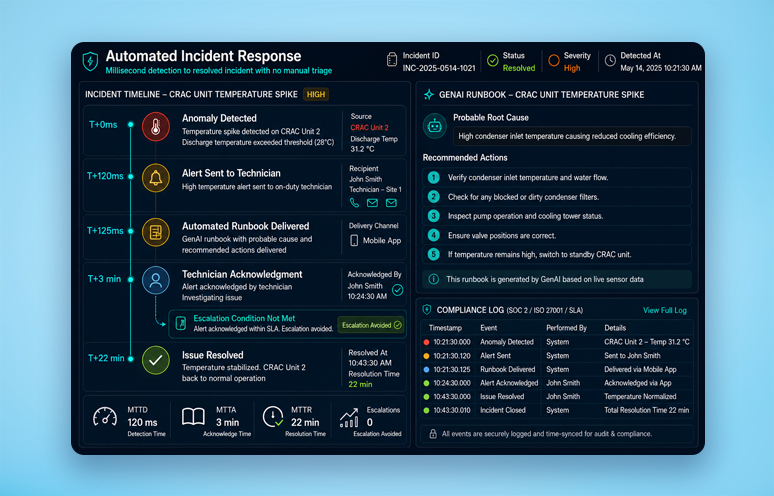
Incident response defines how teams detect, contain, and resolve failures. The first minutes after an outage are critical for containment.
How a contractor’s power mishap cost British Airways £58 million:
One of the contractors working at the data center near Heathrow disconnected a power connection to one of the equipment units as part of the maintenance process. Connecting the power source inappropriately led to a spike in power, which damaged the system in two of the data centres. Therefore, over three days, the company had to cancel 675 flights. British Airways is reported to have lost £58 million due to the compensation paid.
This case demonstrates why documented incident response plans matter as much as technology.
Some helpful tips on incident response include:
- Setting up roles, escalation procedures, and communications prior to the incident.
- Performing incident simulations similar to fire drills prior to an incident.
- Conducting comprehensive post-incident analysis to understand the cause and avoid repetition.
- Having good internal communications. The 2021 Meta outage problem was exacerbated due to internal communications relying on the same network that failed.
By following these tips, it is ensured that data centers can handle unexpected incidents effectively.
Best practice #6: Business continuity and disaster recovery
Plan for the day when everything fails at once.
Business continuity planning ensures critical services remain operational during major disruptions. Disaster recovery focuses on restoring IT systems and data after serious failures. Together, they protect organizations from natural disasters, cyberattacks, and infrastructure failures.
A strong plan starts with identifying mission-critical systems.
- Backup data centers in diverse regions provide redundancy if a primary site goes offline. The British Airways incident revealed a flaw. Its backup site failed alongside the primary. Experts pointed to it as a design flaw. Proper disaster recovery design keeps backup systems electrically and operationally independent.
- Failover systems need testing on a regular basis, not just once at launch. An untested backup can fail when it’s needed most.
- Out-of-band access paths, those not dependent on primary infrastructure, are important. Cloudflare’s public analysis of the 2021 Meta outage showed how deeply interconnected internal systems can amplify failures.
- Clear recovery time objectives (RTOs) and recovery point objectives (RPOs) should guide every continuity plan. These targets define how quickly systems must return and how much data loss is acceptable.
Implementing DCIM best practices is a good start, but adopting the right DCIM software can take efficiency to the next level. If you are evaluating or deploying a DCIM solution, here are the core capabilities to consider.
Best practice #7: DCIM software capabilities
Deploy software that delivers full visibility and control over operations.
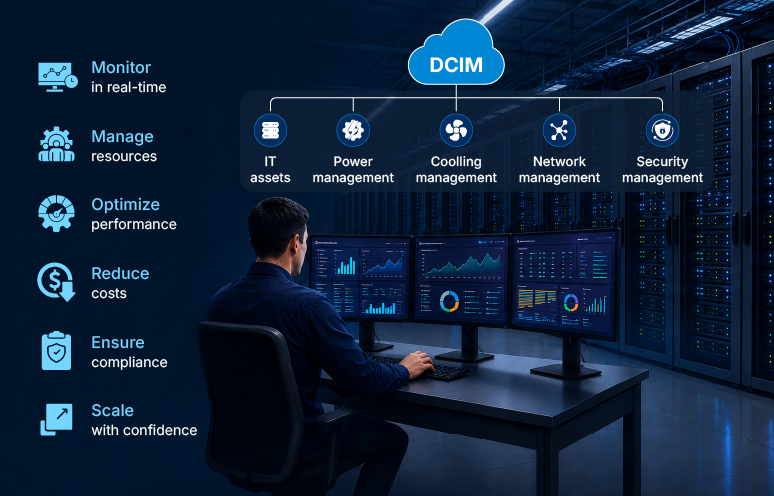
DCIM software unifies power, cooling, capacity, and asset data into a single operational view. Most software offers:
1.Real-time monitoring: Pulls live data from sensors, power meters, and networked equipment.
2.Asset inventory: Maintains a digital record of every server, switch, and rack.
3.Capacity planning tools: Forecast when power, cooling, or space will run out based on current trends.
4.Workflow automation: Handles routine tasks, such as ticket creation when a sensor reports an anomaly.
5.3D facility maps: Show exactly where each asset is located for fast maintenance or emergency response.
Ocient’s Hyperscale Data Warehouse embodies this principle at the software layer. It lets customers extract insights from massive data sets with minimal hardware footprint.
Additional factors to consider when choosing DCIM software:
- Facility size and growth plans. Some solutions are best for single sites, others for global management.
- Integration with existing IT service management systems, allowing alerts to automatically generate tickets for operations teams.
- Cloud-based delivery, which updates dashboards without on-site installs.
- Open standards for data exchange to ensure interoperability and avoid vendor lock-in.
Your next step: choosing the right DCIM solution
Data center infrastructure management is not a simple checklist. It’s an ongoing combination of daily operations, careful planning, and continuous monitoring. The real-world examples throughout this guide, from Google’s cooling AI to Meta’s 2021 outage and British Airways’ backup failure, illustrate the high stakes. Small gaps in change management or environmental monitoring can lead to costly and widely felt failures in just hours.
Strong DCIM best practices help organizations avoid these pitfalls while supporting growth and new technologies like AI. As data center demand continues to climb through 2026 and beyond, this discipline will grow in importance.
Map your manual workflows today to start managing data center infrastructure operations
You don’t need a massive software rollout on day one to start improving your facility’s efficiency. The fastest path to reducing risk is identifying where manual effort creates operational lag.
Here can be your three immediate next steps:
1.Audit shift handovers: Check if critical environmental or capacity trends are being tracked across shifts.
2.Review change management approvals: Verify whether routine command checks go through automated safety verification or peer review before execution.
3.Run a failover simulation: Schedule an out-of-band disaster recovery test to ensure secondary systems operate independently of the primary facility.
Closing these operational gaps today establishes the foundation required to maximize ROI when you deploy DCIM software.